Square Lattice Square Expansion
This example computes the linked cluster expansion on the square lattice up to order 3 using corner-sharing squares.
Setup
Define the unit cell with basis positions, primitive vectors, and nearest-neighbour bonds:
using Lincege

square_cluster_basis = [[[-1 / 2, -1 / 2], [-1 / 2, 1 / 2], [1 / 2, -1 / 2], [1 / 2, 1 / 2]]]
square_cluster_pvecs = [[1.0, 1.0], [1.0, -1.0]]
square_cluster_lbonds = [
        ExpansionBond([1, 1], [1, 2], [0, 0], 1),
        ExpansionBond([1, 1], [1, 3], [0, 0], 1),
        ExpansionBond([1, 2], [1, 4], [0, 0], 1),
        ExpansionBond([1, 3], [1, 4], [0, 0], 1),
]
square_cluster_ebonds = [
        Bond(1, 1, [1, 0], 1),
        Bond(1, 1, [0, 1], 1),
]
square_cluster_uc = ExpansionUnitCell(
        square_cluster_basis,
        square_cluster_pvecs,
        square_cluster_lbonds,
        square_cluster_ebonds,
        [[1, 1, 1, 1]]
)
ExpansionUnitCell([[-0.5 -0.5 0.5 0.5; -0.5 0.5 -0.5 0.5]], [1.0 1.0; 1.0 -1.0], [[1, 1, 1, 1]], [[1, 2, 2, 1]], ExpansionBond[ExpansionBond([1, 1], [1, 2], [0, 0], 1), ExpansionBond([1, 1], [1, 3], [0, 0], 1), ExpansionBond([1, 2], [1, 4], [0, 0], 1), ExpansionBond([1, 3], [1, 4], [0, 0], 1)], Bond[Bond(1, 1, [1, 0], 1), Bond(1, 1, [0, 1], 1)])Each expansion element is a four-site square. The ExpansionBond entries connect physical sites, while the separate Bond entries connect neighboring expansion elements. Equal site colors and bond types treat the sites and interactions as equivalent.
Imaging the unit cell and lattice
Load Plots and ColorSchemes to activate the plotting extension. The dashed black lines outline the primitive cell; the solid lines are physical bonds.
using Plots, ColorSchemes
image_unit_cell(square_cluster_uc)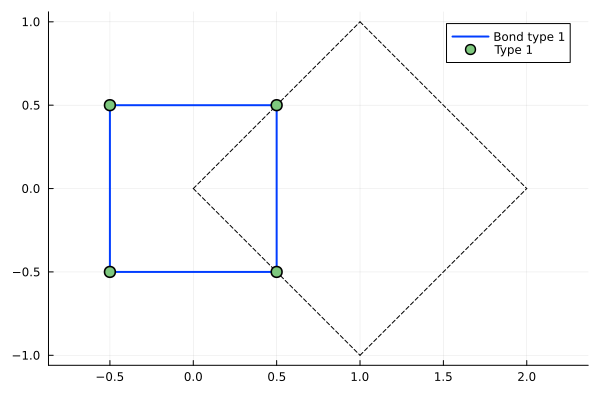
The repeated lattice merges coincident shared sites. Enable the optional gray dashed overlay to show connections between the centers of neighboring squares. These connections describe the expansion geometry, rather than physical bonds.
image_lattice(square_cluster_uc; show_expansion_bonds=true)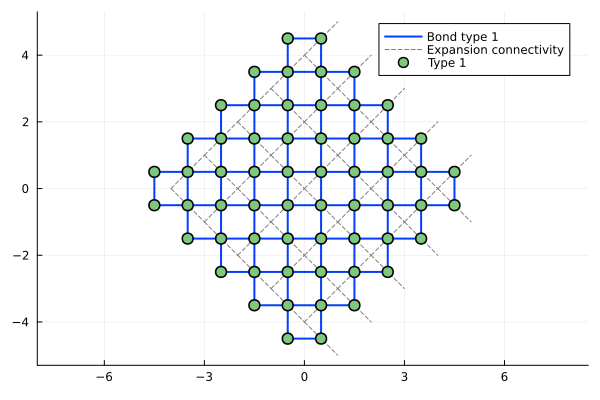
Building the lattice and clusters
The following code generates clusters up to order 3, starting with translational clusters and reducing to isomorphic clusters. Here order counts expansion elements.
Use WeakClusterExpansionLattice because neighboring squares share corner sites.
m_order = 3
lattice = WeakClusterExpansionLattice(m_order, square_cluster_uc)

trans_clusters = TranslationClusterSet(lattice)
clusters_from_lattice!(trans_clusters, lattice)

iso_clusters = IsomorphicClusterSet(lattice)
reduce_clusters!(iso_clusters, trans_clusters)
ClusterSet{IsomorphicHasher} with 4 clustersComputing the expansion
The final NLCE expansion weights are computed recursively.
expansion = Expansion(iso_clusters, lattice)
summation!(expansion, m_order)
Expansion(Dict{UInt64, Lincege.ExpansionCluster}(0x2625a064e3993c6c => Lincege.ExpansionCluster(Vertices: [18, 19, 24, 25, 26, 67, 73, 74, 80, 81], 2.0, UInt64[0x14acd1057b698a40, 0x14acd1057b698a40, 0x14acd1057b698a40, 0x14acd1057b698a40, 0x14acd1057b698a40, 0x14acd1057b698a40, 0x14acd1057b698a40, 0x14acd1057b698a40, 0x14acd1057b698a40, 0x14acd1057b698a40, 0x4105c537b69a61e0, 0x295bed9436114cdf, 0x295bed9436114cdf, 0x4105c537b69a61e0, 0x295bed9436114cdf], Dict{UInt64, Float64}(0x2625a064e3993c6c => 1.0, 0x295bed9436114cdf => 1.0, 0x4105c537b69a61e0 => -2.0, 0x14acd1057b698a40 => 0.0)), 0x966e228371414e3b => Lincege.ExpansionCluster(Vertices: [11, 12, 18, 19, 25, 26, 60, 67, 74, 81], 1.0, UInt64[0x14acd1057b698a40, 0x14acd1057b698a40, 0x14acd1057b698a40, 0x14acd1057b698a40, 0x14acd1057b698a40, 0x14acd1057b698a40, 0x14acd1057b698a40, 0x14acd1057b698a40, 0x14acd1057b698a40, 0x14acd1057b698a40, 0x4105c537b69a61e0, 0x295bed9436114cdf, 0x4105c537b69a61e0, 0x295bed9436114cdf, 0x295bed9436114cdf], Dict{UInt64, Float64}(0x966e228371414e3b => 1.0, 0x295bed9436114cdf => 1.0, 0x4105c537b69a61e0 => -2.0, 0x14acd1057b698a40 => 0.0)), 0x295bed9436114cdf => Lincege.ExpansionCluster(Vertices: [25, 26, 74, 81], 0.5, UInt64[0x14acd1057b698a40, 0x14acd1057b698a40, 0x14acd1057b698a40, 0x14acd1057b698a40], Dict{UInt64, Float64}(0x295bed9436114cdf => 1.0, 0x14acd1057b698a40 => -4.0)), 0x4105c537b69a61e0 => Lincege.ExpansionCluster(Vertices: [24, 25, 26, 73, 74, 80, 81], 1.0, UInt64[0x14acd1057b698a40, 0x14acd1057b698a40, 0x14acd1057b698a40, 0x14acd1057b698a40, 0x14acd1057b698a40, 0x14acd1057b698a40, 0x14acd1057b698a40, 0x295bed9436114cdf, 0x295bed9436114cdf], Dict{UInt64, Float64}(0x295bed9436114cdf => -2.0, 0x4105c537b69a61e0 => 1.0, 0x14acd1057b698a40 => 1.0)), 0x14acd1057b698a40 => Lincege.ExpansionCluster(Vertices: [1], 1.0, UInt64[], Dict{UInt64, Float64}(0x14acd1057b698a40 => 1.0))), Vector{UInt64}[[0x14acd1057b698a40], [0x295bed9436114cdf], [0x4105c537b69a61e0], [0x2625a064e3993c6c, 0x966e228371414e3b]], 1)Writing to JSON
Lastly, write the results to a JSON file for future computations.
write_to_json(expansion, lattice, joinpath(output_dir, "square_lattice_weak_cluster_expansion.json"))