Kagome Lattice
This example computes the linked cluster expansion on a kagome lattice up to order 3.
Setup
Define the three-site kagome unit cell:
using Lincege

kagome_basis = [[0.0, 0.0], [1.0, 0.0], [0.5, sqrt(3) / 2]]
kagome_pvecs = [[2.0, 0.0], [1.0, sqrt(3)]]
kagome_bonds = [Bond(1, 2, [0, 0], 1), Bond(2, 3, [0, 0], 1), Bond(3, 1, [0, 0], 1),
        Bond(1, 2, [-1, 0], 1), Bond(1, 3, [0, -1], 1), Bond(2, 3, [1, -1], 1)]
kagome_uc = UnitCell(kagome_basis, kagome_pvecs, kagome_bonds, [1, 1, 1])
UnitCell([0.0 1.0 0.5; 0.0 0.0 0.8660254037844386], [2.0 1.0; 0.0 1.7320508075688772], [1, 1, 1], Bond[Bond(1, 2, [0, 0], 1), Bond(2, 3, [0, 0], 1), Bond(3, 1, [0, 0], 1), Bond(1, 2, [-1, 0], 1), Bond(1, 3, [0, -1], 1), Bond(2, 3, [1, -1], 1)])The kagome geometry consists of corner-sharing triangles with three bonds inside the triangle and three outside. The offsets [-1, 0], [0, -1], and [1, -1] connect to neighboring triangles. Keeping all site colors and bond types equal treats these sites and interactions as equivalent.
Imaging the unit cell and lattice
Loading the Plots dependency automatically activates Lincege.jl's plotting capabilities.
using Plots, ColorSchemes
image_unit_cell(kagome_uc)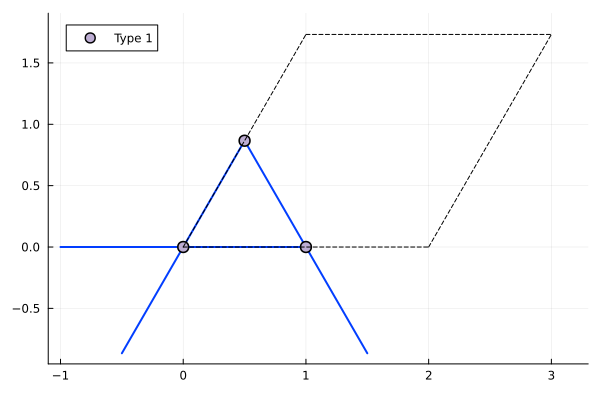
image_lattice(kagome_uc)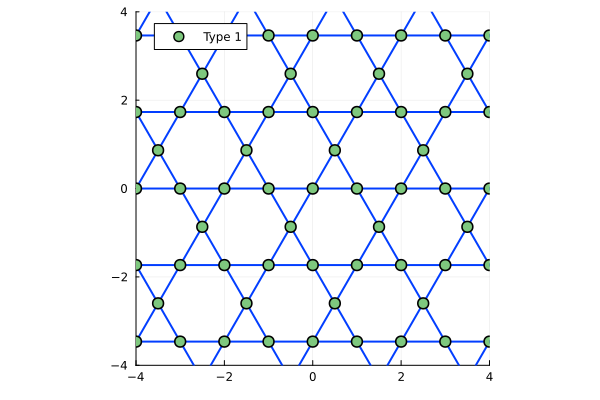
Building the lattice and clusters
The following code generates clusters up till order 3, starting with translational clusters and reducing to isomorphic clusters.
m_order = 3
lattice = SiteExpansionLattice(m_order, kagome_uc)

trans_clusters = TranslationClusterSet(lattice)
clusters_from_lattice!(trans_clusters, lattice)

iso_clusters = IsomorphicClusterSet(lattice)
reduce_clusters!(iso_clusters, trans_clusters)
ClusterSet{IsomorphicHasher} with 4 clustersComputing the expansion
The NLCE expansion final weights are computed recursively.
expansion = Expansion(iso_clusters, lattice)
summation!(expansion, m_order)
Expansion(Dict{UInt64, Lincege.ExpansionCluster}(0x757e0ac51ad2d852 => Lincege.ExpansionCluster(Vertices: [25, 74, 116], 4.0, UInt64[0x6a7f9b876202d912, 0x14acd1057b698a40, 0x6a7f9b876202d912, 0x14acd1057b698a40, 0x14acd1057b698a40], Dict{UInt64, Float64}(0x757e0ac51ad2d852 => 1.0, 0x6a7f9b876202d912 => -2.0, 0x14acd1057b698a40 => 1.0)), 0xae4199ce7ea02294 => Lincege.ExpansionCluster(Vertices: [25, 73, 116], 0.6666666666666666, UInt64[0x6a7f9b876202d912, 0x14acd1057b698a40, 0x6a7f9b876202d912, 0x6a7f9b876202d912, 0x14acd1057b698a40, 0x14acd1057b698a40], Dict{UInt64, Float64}(0xae4199ce7ea02294 => 1.0, 0x6a7f9b876202d912 => -3.0, 0x14acd1057b698a40 => 3.0)), 0x6a7f9b876202d912 => Lincege.ExpansionCluster(Vertices: [25, 74], 1.9999999999999998, UInt64[0x14acd1057b698a40, 0x14acd1057b698a40], Dict{UInt64, Float64}(0x6a7f9b876202d912 => 1.0, 0x14acd1057b698a40 => -2.0)), 0x14acd1057b698a40 => Lincege.ExpansionCluster(Vertices: [74], 1.0, UInt64[], Dict{UInt64, Float64}(0x14acd1057b698a40 => 1.0))), Vector{UInt64}[[0x14acd1057b698a40], [0x6a7f9b876202d912], [0x757e0ac51ad2d852, 0xae4199ce7ea02294]], 0)Writing to JSON
Lastly, the results are written to a JSON file to be used for future computations.
write_to_json(expansion, lattice, joinpath(output_dir, "kagome_lattice_site_expansion.json"))